Surface
QuickBooks Payroll onboarding import flow for firms switching from another payroll service
Team
1 Product Manager · 3 Engineers · Designer (me) · 8 Partner Council Accountants
Scope
A/B Testing · Field Research · Prototyping · AI-Assisted Design
THE PROBLEM
Moving payroll to QuickBooks meant re-keying everything by hand, so switching felt riskier than staying put
Accountants migrating clients from Gusto, ADP, or another payroll service had no
guided way to bring historical payroll data into QuickBooks. The team's early bet was
that the fix was speed: get accountants through import fast, with AI doing as much of
the heavy lifting as possible.
INITIAL APPROACH — A/B TEST
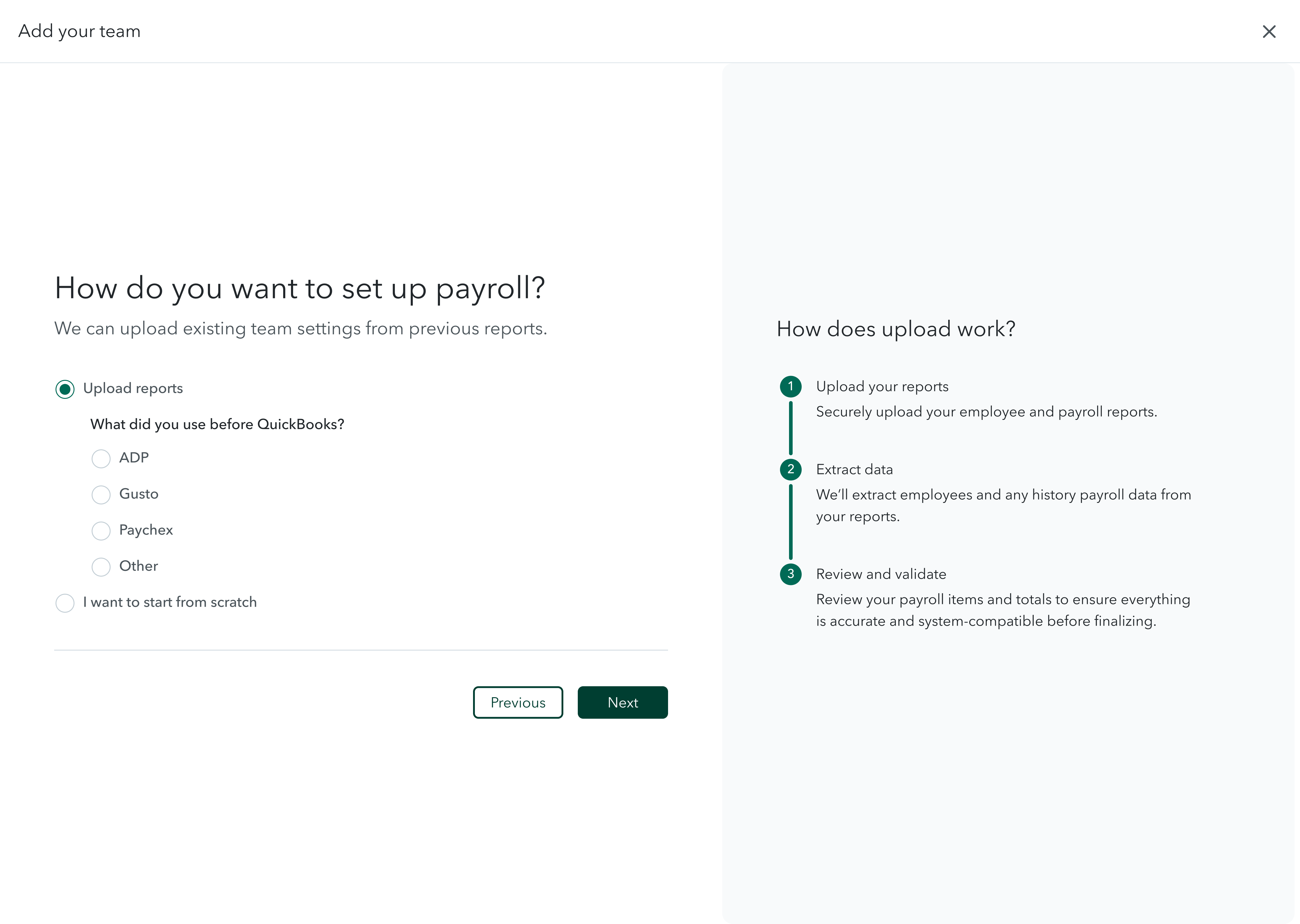
We tested a faster, more agentic import flow against the existing guided one
Most users were opting for manual entry over our upload feature,
even though upload was faster. We ran an A/B test to see whether surfacing the upload
steps more clearly, showing users exactly what the process looked like, would prompt
more of them to choose upload over typing everything in by hand. Control kept the
existing flow, where upload was available but not emphasized. Test walked users through
the upload steps up front, before they had a chance to default to manual entry.
Both variants included a human-in-the-loop step: a human payroll
expert reviewed the AI's extracted upload before it was finalized, catching errors the
model missed. It was meant as a safety net behind the automation — not yet the centerpiece
of the experience.
control: guided, step-by-step
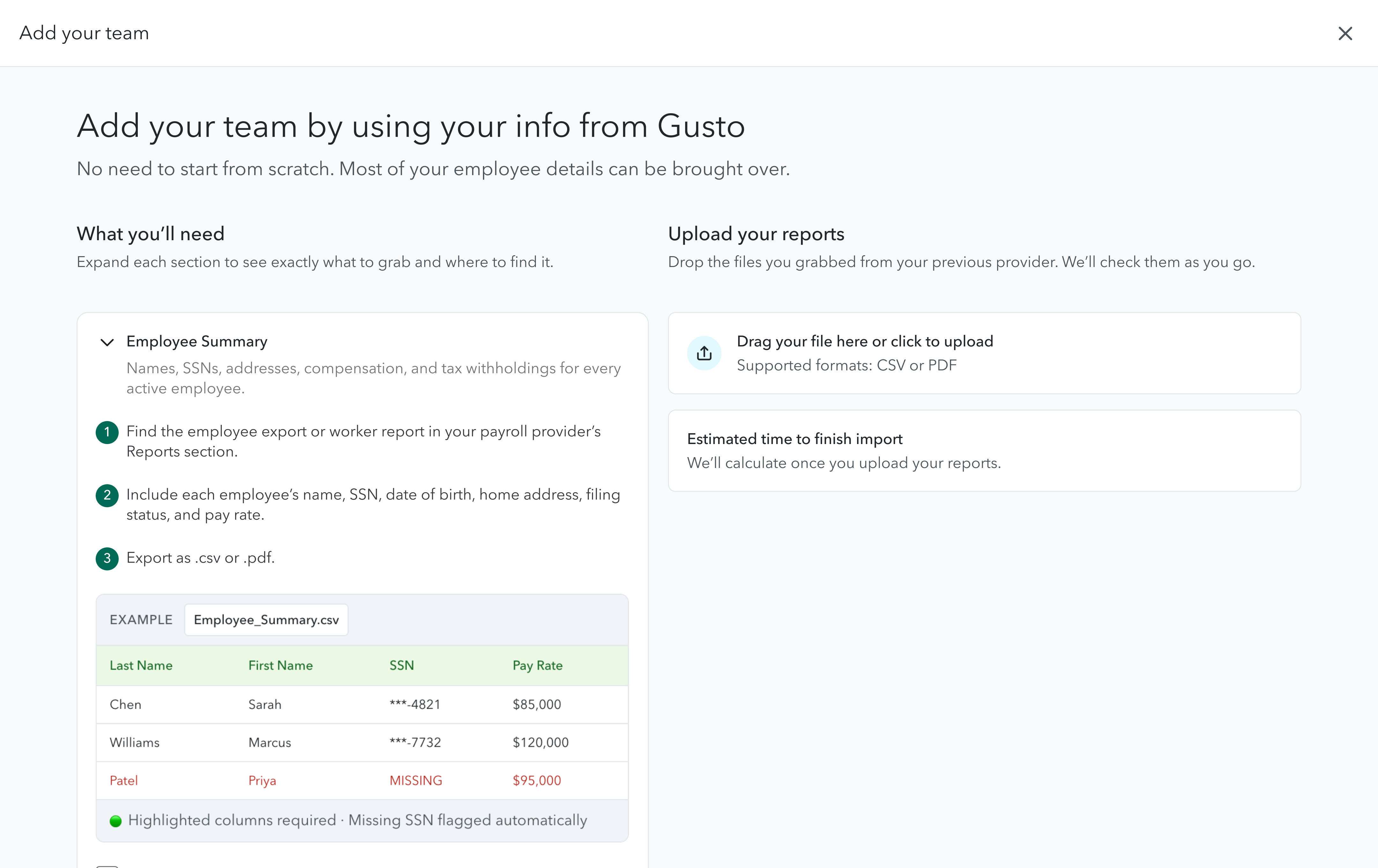
test: upload-first, agentic
RESULT
Test moved the metrics we were watching, but it couldn't tell us why accountants still hesitated
The test variant moved the needle on
paper. But the data could only tell us what happened, not why some accountants still
dropped off, or why the ones who finished didn't fully trust what they saw. That gap
is what sent us into the field.
PARTNER COUNCIL
A week embedded with the accountants the A/B test could never explain
The Intuit Partner Council is a select group of accounting
professionals who provide strategic feedback to shape QuickBooks products. Our on-site
sessions were structured around gallery walks, a format where accountants engage
directly with live prototypes and share unfiltered feedback.
THE WEEK AT A GLANCE
Four days, moving from whiteboarding to gallery walks with accountants across firm sizes
Mon
Whiteboarding + Gallery Walk
1 accountant
Prototype walkthrough with Zane Stevens
Tue
Whiteboarding + Gallery Walk
1 accountant
Team alignment on import re-imagination
Wed
Pre-Council Session
3 accountants
Current onboarding gaps deep-dive
Thu
Gallery Walks
3 accountants
Validation pain points + future wishlist
Perspectives from small, large, and mega-large accounting firms. From 1-person practices to 200+ client operations.
THE REFRAME
Accountants want accuracy. We'd been optimizing for speed.
- What we assumed: speed is the competitive advantage, agentic import means frictionless wins, users want QuickBooks to "do it for them."
- What accountants told us: payroll should never be rushed, they want to check every line themselves. "Could you do it in a day? Yes. Should you?"
The resolution wasn't picking a winner
between control and test. It was duality: a guided experience accountants can control,
plus an agentic mode they can cross-reference against it.
WHAT WE HEARD
Six themes, consistent across all four days and every firm size
01
Validate everything. Accountants want to see exactly where data is pulled from and check every line before accepting it.
02
Prep checklist missing. No clear list of what to have on hand — this alone kills confidence and drives users back to manual entry.
03
Rigid validation blocks. The system stops entirely if imported numbers don't match. "Just read what it is" — fix later.
04
PII + AI = legal risk. Serious concerns about SSNs, names, and addresses going through cloud-based AI agents.
05
UI built for SMB, not accountants. Full-screen, simplified views and AI panels hog space. Accountants manage 200+ clients and need density.
06
Personalize by prior provider. "Tell me what payroll reports to pull from Gusto." Every accountant wants instructions tailored to their source.
TWO USERS, ONE IMPORT FLOW
The A/B test pitted one flow against two audiences with opposite needs
| Category | Accountant | SMB Owner |
|---|
| Priority | Accuracy above all else | Speed and simplicity |
| Validation | Check every line manually | Just needs it to work |
| View | Dense, spreadsheet-like | Clean, guided, step-by-step |
| AI | Sceptical — PII concerns | Open to full automation |
| Prep | Provider-specific checklist | Simple "what you'll need" |
| Error fixing | Self-serve amendments | Guided support / call |
HOW WE STACK UP
Accountants named Gusto and ADP as top competitors — each does one thing we didn't yet do well
Gusto
Fast but opaque
Strengths
- Anchors to a specific payday
- AI assistant (Gus) handles complex tasks
Gap
- Limited explainability
- Users don't know why decisions were made
ADP
Trusted but slow
Strengths
- High-touch validation for complex historical data
- Strong accuracy reputation
Gap
- Slow and manual
- Validation costs speed
QuickBooks
Opportunity to win both
Strengths
- Deep QBO integration
- Positioned to offer guided AND agentic
Gap
- Rigid validation = hard blockers
- Perceived as not built for accountant workflows
CLOSING THE LOOP
Rather than starting over, we used AI to rapidly re-test the original flow against what we'd just learned
The upload-first prototype we'd shown Zane on day one had no
checklist, no prep guidance, no provider context; it optimized for the exact thing
Partner Council told us to deprioritize. We used AI-assisted generation to iterate
checklist layouts, provider-specific copy, and validation states quickly enough to
bring a reframed prototype back within the same sprint.
DECISION 01
Replaced the upload-first flow with a guided, provider-personalized checklist
Zane said it first on Monday, and we heard it every day after:
"Payroll should never be rushed. I want to check every line." Speed was our bet.
Accuracy was their need. The checklist wasn't a small addition but rather the core
missing piece that unlocked trust in the entire import flow.
DECISION 02
Removed hard blockers — accept, flag, fix later
Hard blockers destroy trust. The redesign accepts historical data
as-is, flags discrepancies inline, and lets accountants resolve them at their own pace
after import succeeds instead of stopping the entire flow the moment a number looks off.
- Before: generic flow, same for new users and switchers; no prep checklist; no way to cross-reference imported vs. source data; overwhelming onboarding on first view.
- After: switcher-identified flow with personalized prep checklist; agentic
experience of imported data with the option to review manually; flags discrepancies
inline; accept-and-flag import with no hard blockers on historical data.
DESIGN PRINCIPLES FROM THE FIELD
What held up across all four days, and what we're building from now
01
Show your sources. Accountants don't trust data they can't trace. Every imported value needs a visible origin.
02
Prepare before you import. Confidence is built in the prep stage, not recovered from errors after the fact.
03
Accuracy over speed. For accountants, a fast mistake is worse than a slow success. Frame control, not speed.
04
Accept, flag, fix later. Import the data, surface anomalies inline, resolve at own pace.
05
Design for the operator. The accountant managing 200 clients needs density and audit tools. The SMB owner needs simplicity.
06
Personalize by context. "Payroll reports" means nothing. "Pull the YTD Summary from Gusto" means everything.
WHAT'S NEXT
"Payroll should never be rushed. I want to check every line."
— Zane Stevens, Protea Financial
The checklist prototype enters development next sprint, alongside removing hard
import blockers. Longer-term: rethinking how the agentic experience fits into
payroll onboarding at all, and scaling the import feature for firms managing
200+ clients.